6 Rejections, 1 Approval: Shipping In-App Purchases with React Native & RevenueCat
 Mohit Kumar·April 2, 2026·10 min read
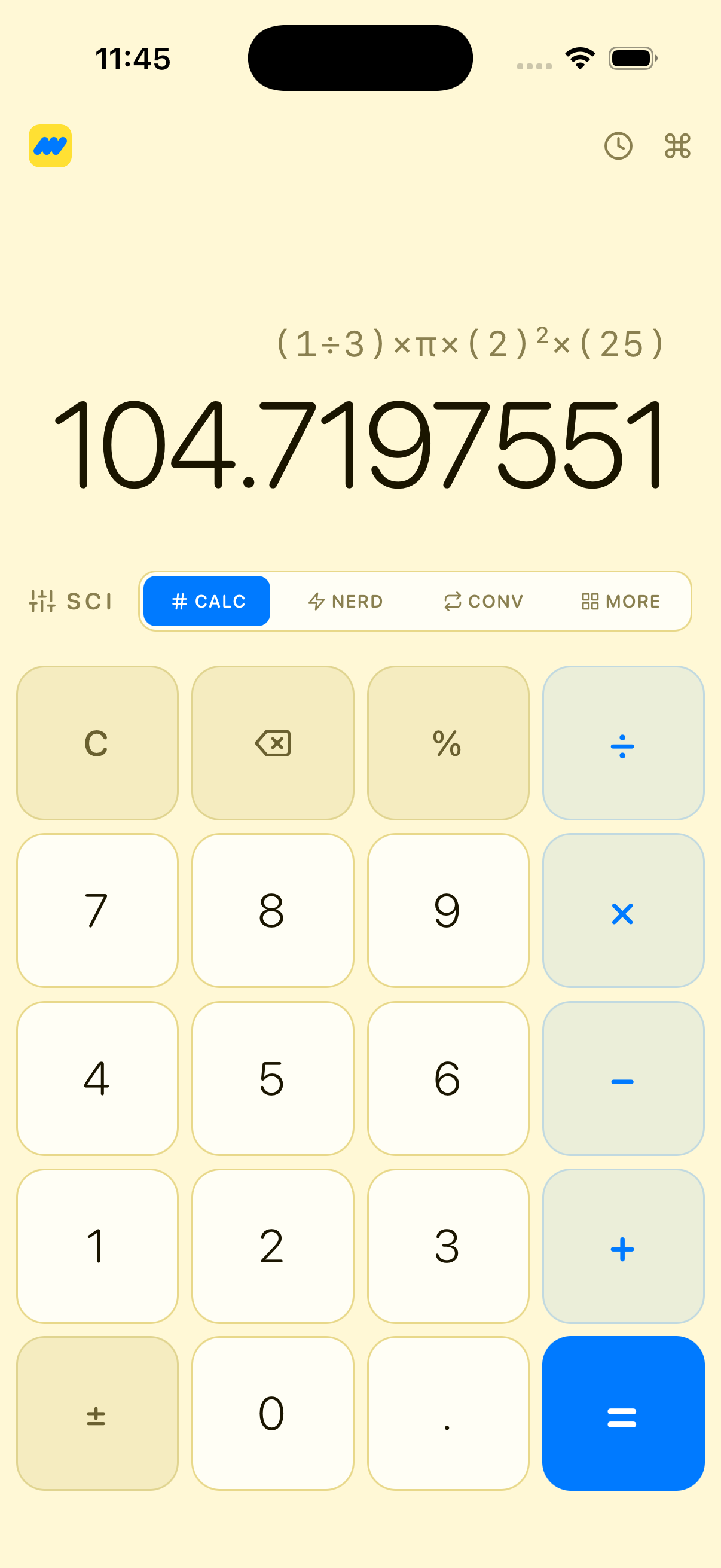
Maffs is a scientific calculator app I built with React Native and Expo. It has an AI-powered "Nerd Mode," interactive graphs, unit conversion, statistics, six custom themes, and three in-app purchase tiers. It's the kind of app that looks simple from the outside but has a lot going on under the hood.
This post isn't about how I built it — that's Part 2. This one is about the part nobody warns you about: getting an app with in-app purchases through Apple's App Review.
It took me 6 rejections and roughly two weeks to get Maffs approved. This was my first time adding IAPs to any app I've ever shipped. I knew the first rejection was coming — I just didn't know how many more would follow.
What Is Maffs?
Maffs is a calculator app, but not the kind that ships with your phone. It's built around three tiers:
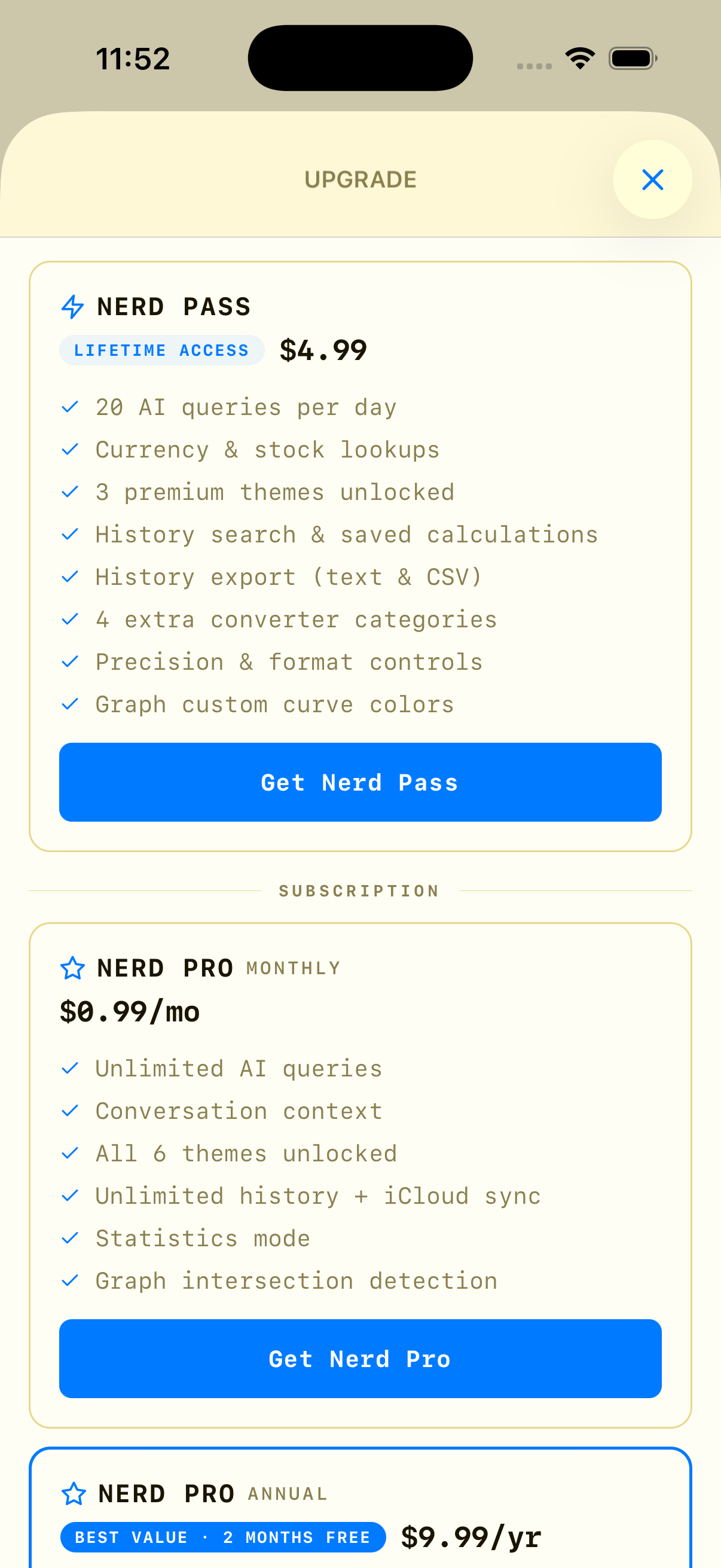
| Tier | Price | What You Get | |------|-------|--------------| | Free | $0 | Calculator, converter, graphs, 3 themes, 100-item history | | Nerd Pass | $4.99 (lifetime) | 20 AI queries/day, history search & export, precision controls, 6 themes | | Nerd Pro | $1.99/mo or $14.99/yr | Unlimited AI, conversation context, statistics, iCloud sync, graph intersections |
The core features:
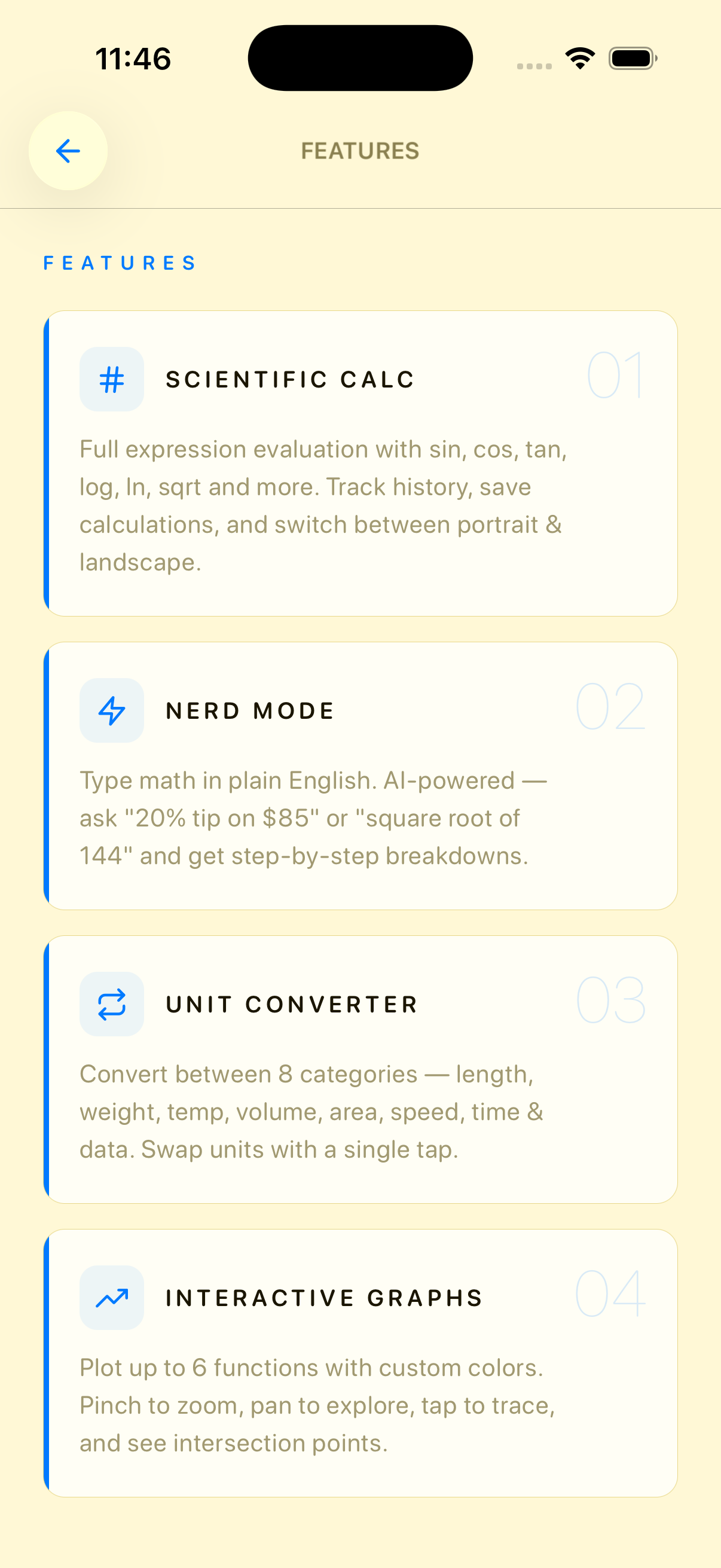
- Scientific Calculator — Full expression evaluation with sin, cos, tan, log, ln, sqrt, and more. Supports history, saved calculations, and a landscape scientific keyboard.
- Nerd Mode — Type math in plain English. Ask "20% tip on $85" or "72°F to Celsius" and get step-by-step breakdowns. Powered by AI.
- Unit Converter — 8 categories (length, weight, temp, volume, area, speed, time, data). Swap units with a tap.
- Interactive Graphs — Plot up to 6 functions. Pinch to zoom, pan to explore, tap to trace coordinates, detect intersections.
- Statistics — Input a data set, get mean, median, mode, standard deviation, variance, and range.
- 6 Themes — Obsidian (luxury gold on black), Maffs (brand blue + yellow), Ocean, Rose, Hacker, Sunset. Each with its own typography and border radius "vibe."
The moment I decided to add paid tiers — a lifetime pass, a monthly subscription, and an annual subscription — the complexity went from "ship it" to "good luck."
The Stack
Before diving into the rejection saga, here's what powers the IAP side of Maffs:
- RevenueCat (
react-native-purchasesv9.14.0) — handles all purchase logic, entitlement management, and receipt validation - Zustand + MMKV — local state persistence for tier, usage counts, and redeem codes
- Expo — build toolchain, with EAS Build + Submit for CI/CD
- App Store Connect — product configuration, agreements, and the review process itself
The architecture is straightforward:
app/_layout.tsx          → calls initialize() on app start
store/subscription.ts    → RevenueCat SDK config, purchase logic, tier state
app/paywall.tsx          → paywall UI, fetches products & prices
plugins/withIAP.js       → Expo config plugin for IAP capability
RevenueCat gets initialized the moment the app mounts:
// app/_layout.tsx
useEffect(() => {
  useSubscriptionStore.getState().initialize();
}, []);
Which triggers this in the store:
// store/subscription.ts
initialize: async () => {
  try {
    const apiKey = process.env.EXPO_PUBLIC_REVENUECAT_IOS_KEY ?? '';
    Purchases.setLogLevel(LOG_LEVEL.ERROR);
    Purchases.configure({ apiKey });
    await get().syncEntitlements();
  } catch (e) {
    console.warn('[RC] init failed:', e);
  } finally {
    set({ isInitialized: true });
  }
},
isInitialized is intentionally set to true even on failure — so the app doesn't hang if RevenueCat is unreachable. The paywall disables purchase buttons until this flag is true.
Setting Up RevenueCat — The Initial Relief, Then the Frustration
The initial setup was fine. Create an account, link your App Store app, configure an API key. RevenueCat's docs walk you through it well enough.
Then I got to the part where I needed to actually show products to users.
RevenueCat has two approaches:
- Paywalls — A drag-and-drop UI builder inside RevenueCat's dashboard. You design your paywall there, and the SDK renders it natively.
- Offerings — You configure products and packages in RevenueCat, fetch them via the SDK, and build your own UI.
When I first saw the Paywalls feature, I was frustrated. Building a whole separate UI inside RevenueCat's dashboard, with its own design constraints, felt like it would take forever to match the look and feel of Maffs. Every theme has its own color palette, border radii, fonts — I couldn't replicate that in a drag-and-drop builder.
Then I realized I could just use Offerings — list my products in RevenueCat, fetch the data, and build my own paywall in React Native. That was the relief moment. Full control over the UI, and RevenueCat handles the backend (receipt validation, entitlement management, subscription lifecycle).
Here's how I configured it:
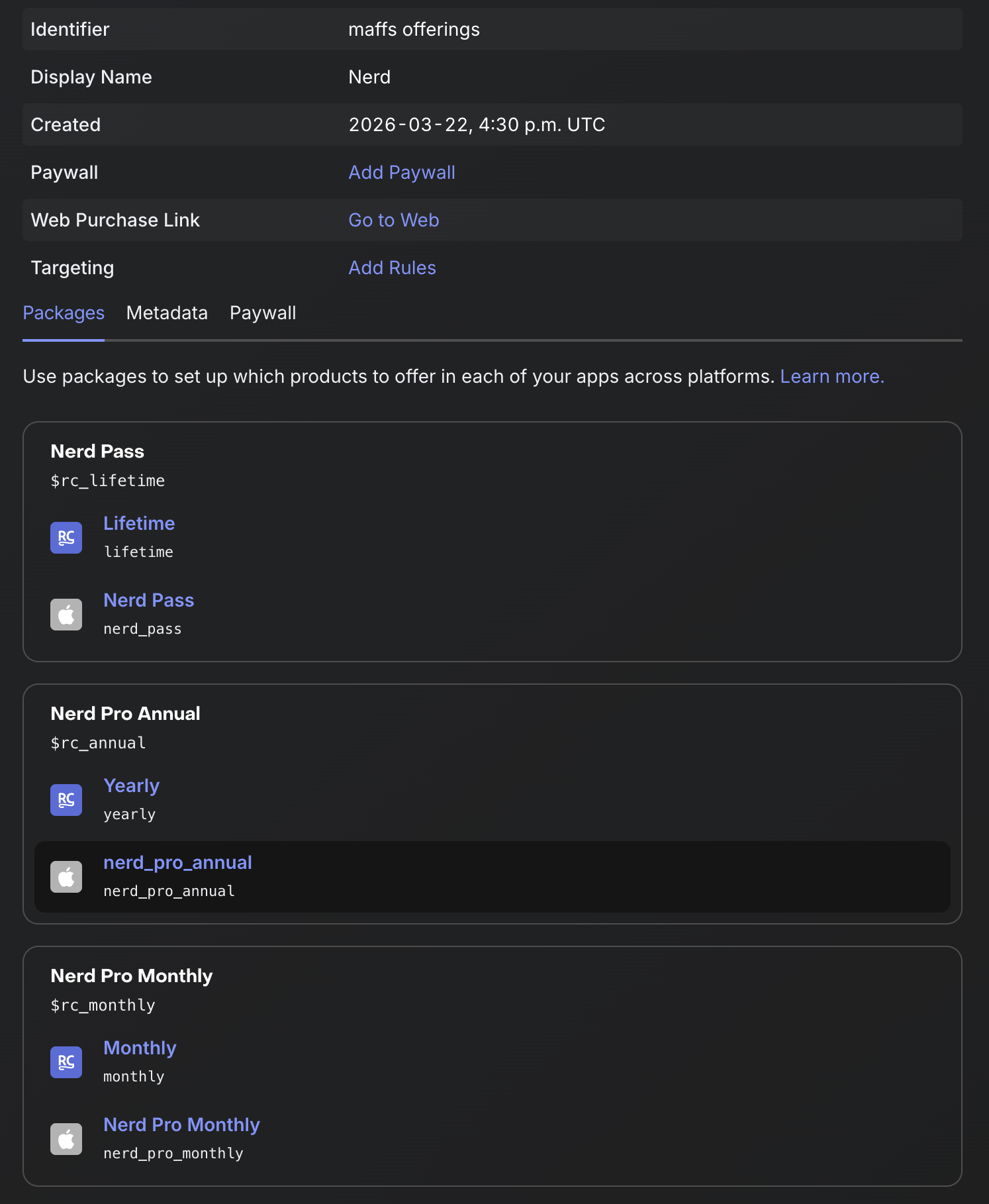
- Offerings: One offering called "maffs offerings" set as the default
- Packages:
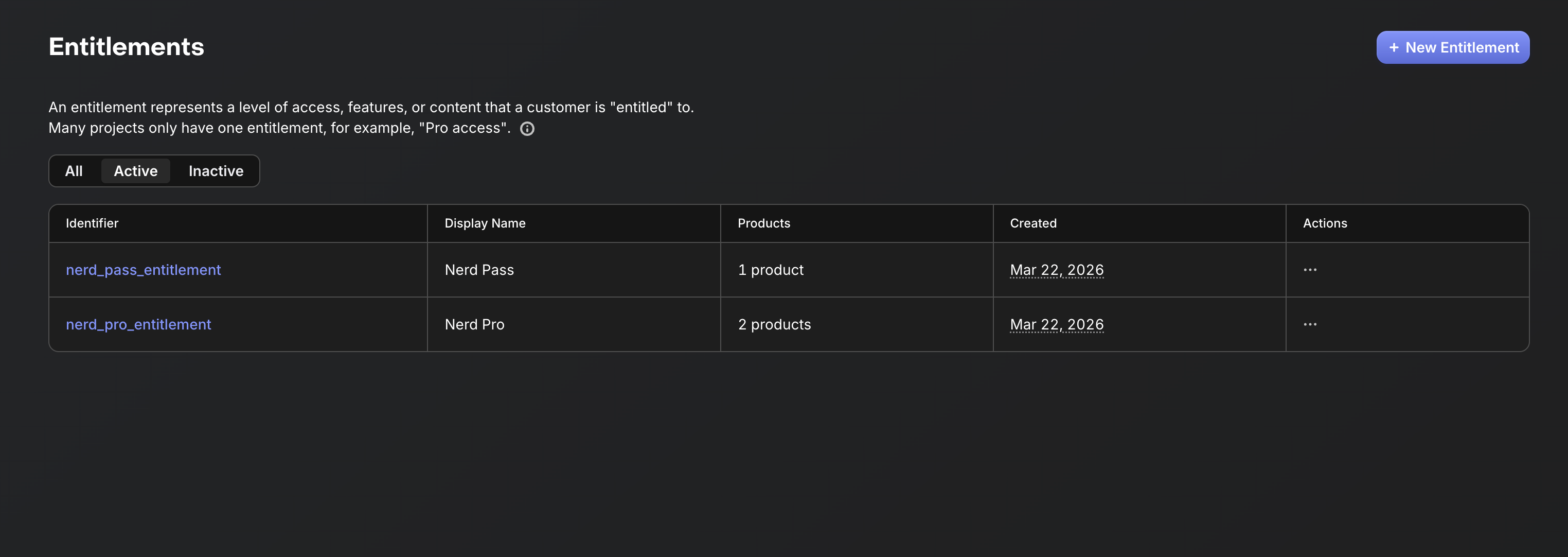
$rc_lifetime(Nerd Pass),$rc_monthly(Nerd Pro Monthly),$rc_annual(Nerd Pro Annual) - Entitlements:
nerd_pass_entitlementandnerd_pro_entitlement - App-specific shared secret: Configured in RevenueCat's app settings (this one is easy to forget)
The Cache Bug That Broke Everything
This is where things got difficult. I had everything configured — products in App Store Connect, offerings in RevenueCat, entitlements mapped — but when I tried to fetch products in the app, I got nothing. Null. Empty.
I tried multiple code changes. I rewrote the fetching logic. I cleared caches, reinstalled the app, signed out and back into sandbox accounts. Nothing worked.
RevenueCat caches offerings from the moment they're first fetched. If your products weren't available at that moment — maybe the Paid Apps Agreement wasn't active yet, maybe StoreKit hadn't propagated — RevenueCat caches the empty state. And it doesn't automatically refresh the storeProduct fields even after the products become available.
I was stuck. Legitimately frustrated. I couldn't display prices, couldn't trigger purchases, couldn't test anything.
The StoreKit Configuration Breakthrough
That's when I created a local StoreKit Configuration file. You can create one in Xcode, sync it from App Store Connect, and point your Xcode scheme to it. This lets you test IAPs in the simulator with local product definitions.
Xcode → Edit Scheme → Run → Options → StoreKit Configuration → Select your .storekit file
The moment I did this, products started appearing locally. I could see prices, trigger purchase sheets, validate the flow. It wasn't production data — it was local testing data — but it proved my code was correct. The issue was entirely on the RevenueCat/StoreKit propagation side.
That gave me the confidence to push forward. I knew my code worked. I just needed the real products to propagate.
The Workaround
For production, I built a dual-path purchase flow:
// store/subscription.ts
purchase: async (productId: string) => {
  if (!get().isInitialized) {
    throw new Error('Store not ready — please wait a moment and try again');
  }
  // Try offerings first, fall back to direct StoreKit purchase
  const offerings = await Purchases.getOfferings();
  const pkg = offerings.current?.availablePackages.find(
    (p) => p.storeProduct?.productIdentifier === productId,
  );
  if (pkg) {
    await Purchases.purchasePackage(pkg);
  } else {
    // RevenueCat cache stale — fetch directly from StoreKit
    const products = await Purchases.getProducts([productId]);
    const product = products.find((p) => p.identifier === productId);
    if (!product) throw new Error('Product not available');
    await Purchases.purchaseStoreProduct(product);
  }
  await get().syncEntitlements();
},
Try offerings first (which includes trial info and package metadata). If the storeProduct is null because of the cache issue, fall back to Purchases.getProducts() — which hits StoreKit directly and bypasses the offerings cache.
The paywall also fetches prices directly instead of relying on offerings:
// app/paywall.tsx
useEffect(() => {
  Purchases.getProducts([
    PRODUCT_IDS.NERD_PASS,
    PRODUCT_IDS.NERD_PRO_MONTHLY,
    PRODUCT_IDS.NERD_PRO_ANNUAL,
  ])
    .then(setProducts)
    .catch(() => {}); // fall back to hardcoded prices
}, []);

const getPrice = (productId: string, fallback: string) =>
  products.find((p) => p.identifier === productId)?.priceString ?? fallback;
If even the direct fetch fails, the UI shows hardcoded fallback prices ("$4.99", "$1.99/mo", "$14.99/yr"). The user always sees something.
App Store Connect — The Agreement I Almost Missed
Setting up products in App Store Connect was straightforward. Create the subscription group, add the monthly and annual products, create the non-consumable lifetime pass. Fill in reference names, product IDs, price tiers, localizations, review screenshots. Standard stuff.
What I almost missed was the Paid Apps Agreement.
In App Store Connect, go to Business → Agreements. There's an agreement for paid apps that requires you to fill in your bank details, tax information, and contact details. Without this agreement in "Active" status, StoreKit won't serve your products in sandbox or production. They just return null.
I didn't know about this at first. I found it online after being frustrated with RevenueCat for what turned out to be an App Store Connect issue. Once I filled in the bank and tax details, things started working — but it took about a day (overnight) for the agreement to fully activate and reflect in the app.
After the agreement was active, I was able to get things working in about a day. The whole flow came together:
- Agreement active → StoreKit serves products
- Products appear in RevenueCat → offerings populate
- App fetches products → prices display
- User taps purchase → StoreKit sheet appears → entitlements sync
Product Configuration Checklist
For anyone going through this for the first time, every IAP product needs:
- Reference name (internal, for your eyes only)
- Product ID (must match what's in your code and RevenueCat)
- Price tier (Apple's tiered pricing matrix)
- Localization (at least one: display name + description)
- Review screenshot (what the product looks like in-app)
- Status: "Ready to Submit" or "Approved"
- Attached to the app version being reviewed
That last one is critical. Your first-time IAPs must be explicitly selected on the app version page under "In-App Purchases and Subscriptions." If you don't attach them, the reviewer won't see them.
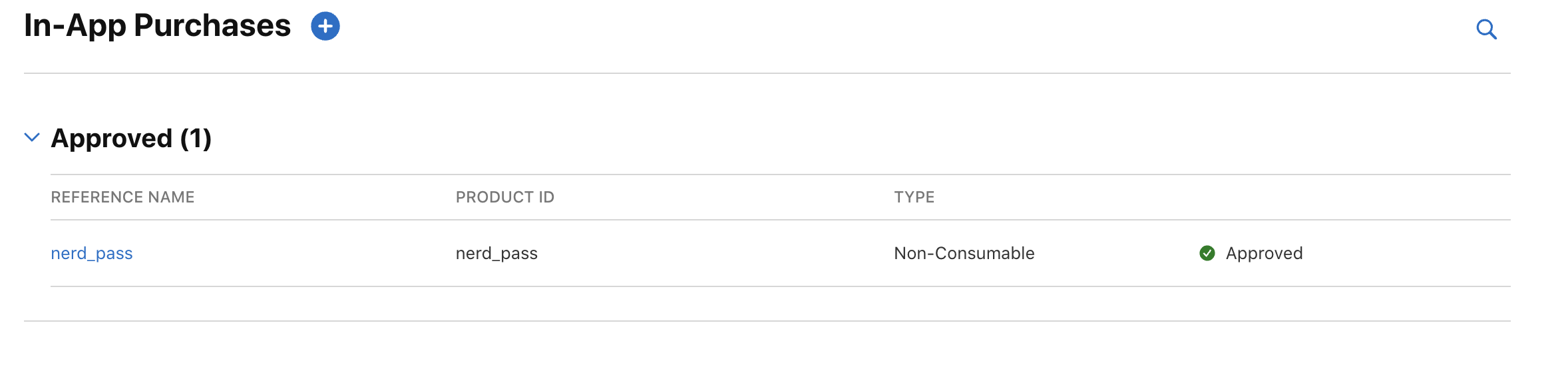
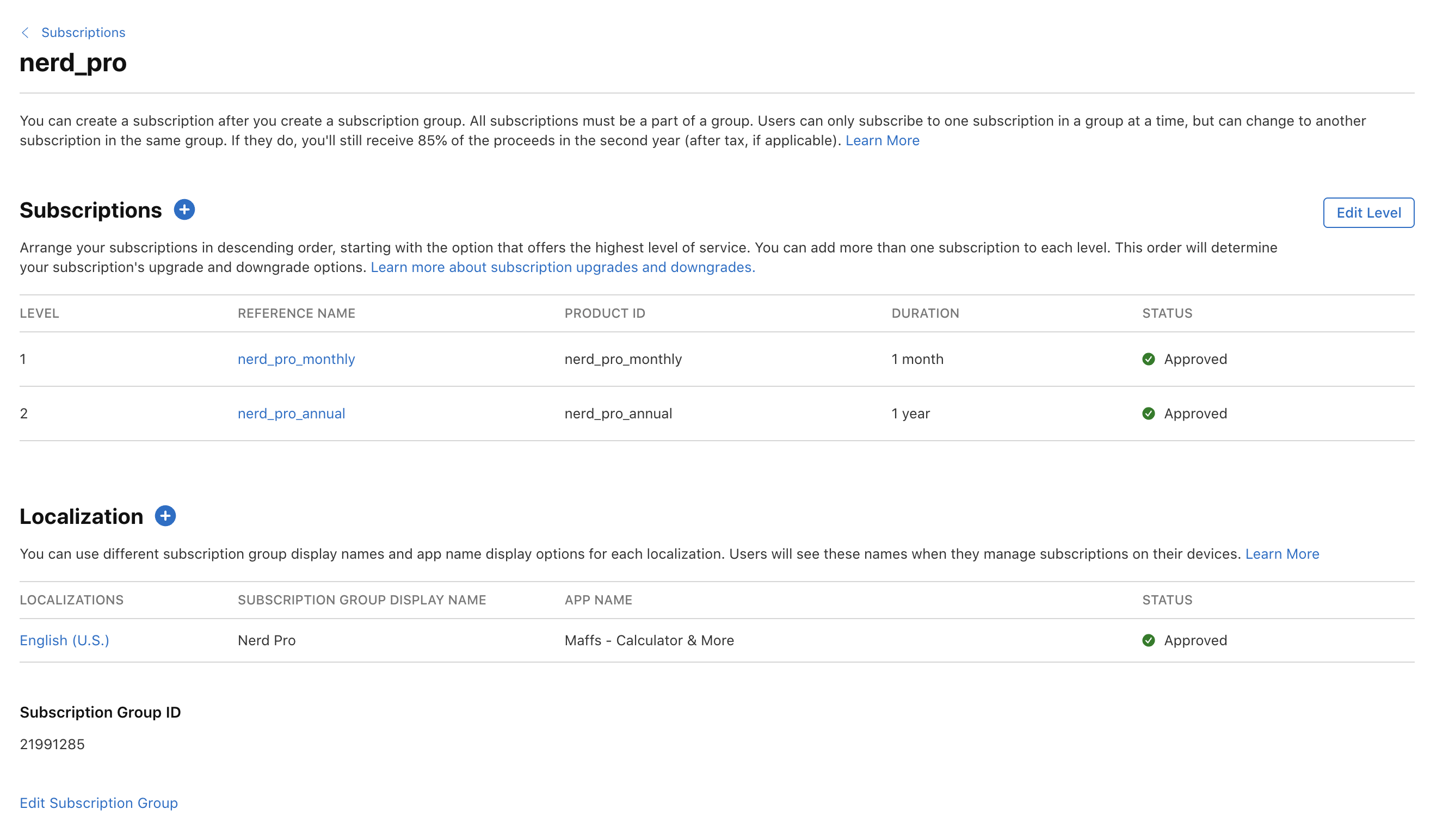
Rejection 1: Guideline 2.1(b) — "We Cannot Locate the In-App Purchases"
March 18, 2026. First submission. First rejection. I expected this one.
The Apple reviewer tested on an iPad Air 11-inch (M2) and said they couldn't find the IAPs — couldn't locate Nerd Pass, Nerd Pro Monthly, or Nerd Pro Annual within the app.
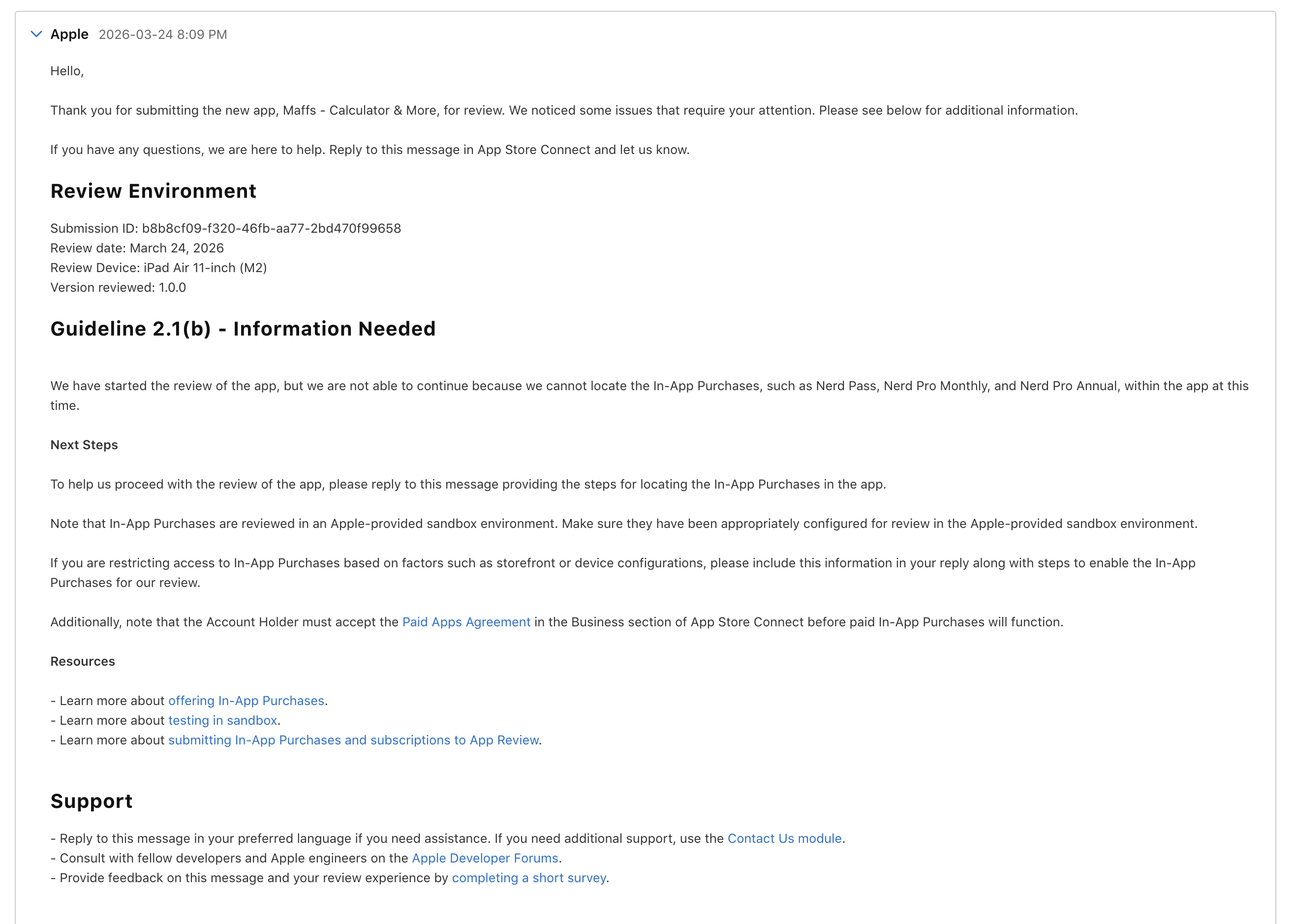
The rejection was vague. "We cannot locate the In-App Purchases." That's it. No details about what they tried, what they saw, or what went wrong.
The root cause was likely one or more of:
- IAP products weren't in "Ready to Submit" status (missing metadata or screenshots)
- Products weren't attached to the app version
- The Paid Apps Agreement wasn't active yet
- RevenueCat offerings/shared secret was misconfigured
I wrote a detailed reply explaining how to find the IAPs:
- Launch the app
- Tap the menu icon (top-left corner)
- Tap "Unlock Nerd Mode" or the subscription status area
- The Paywall screen appears showing all 3 products
- Tap any product → standard App Store purchase sheet (sandbox)
- Restore Purchases is available at the bottom
I also mentioned alternative entry points — tapping Nerd Mode on the calculator prompts free users with the paywall, and previewing a locked theme shows an "Unlock" button.
Rejections 2–4: Guideline 3.1.2(c) + 2.1(b) — The Double Whammy
The next few rejections came in pairs. Every submission got hit with two issues simultaneously:
Guideline 3.1.2(c) — Business — Payments — Subscriptions
"The submission did not include all the required information for apps offering auto-renewable subscriptions."
Apple requires:
- A functional link to the Terms of Use (EULA)
- A functional link to the Privacy Policy
And not just in your App Store metadata — inside the app itself, in the purchase flow.
Apple even recommended using SubscriptionStoreView to include the required info. But that's a SwiftUI component. Maffs is a React Native app using react-native-purchases. That wasn't an option.
The fix was simple once I understood what was needed. I added Terms and Privacy links to the bottom of the paywall:
// app/paywall.tsx
<Text style={styles.disclaimer}>
  Subscriptions auto-renew. Cancel anytime in Settings → Apple ID →
  Subscriptions.
</Text>

<View style={styles.legalRow}>
  <Pressable
    onPress={() => Linking.openURL("https://maffs.skyhit.app/terms")}
    hitSlop={8}
  >
    <Text style={styles.legalLink}>Terms of Use</Text>
  </Pressable>
  <Text style={styles.legalSeparator}>·</Text>
  <Pressable
    onPress={() => Linking.openURL("https://maffs.skyhit.app/privacy")}
    hitSlop={8}
  >
    <Text style={styles.legalLink}>Privacy Policy</Text>
  </Pressable>
</View>
I also needed a Terms of Use link in the App Store metadata — either in the app description or as a custom EULA in App Store Connect.
Guideline 2.1(b) — Performance — App Completeness
"The in-app purchase products in the app exhibited one or more bugs which create a poor user experience. Specifically, the app failed to purchase any subscription."
Same device — iPad Air (M2 and M3 across different submissions). They couldn't complete a purchase in sandbox.
This was the harder one to debug. The products were showing up (I'd fixed the metadata and attachment issues), but the actual purchase flow was failing silently in sandbox.
My thinking: the Paid Apps Agreement activation + StoreKit propagation might not have fully settled. Or RevenueCat's offerings cache was still stale from before the agreement was active.
I hardened the purchase flow with specific error handling:
// app/paywall.tsx
const handlePurchase = async (productId: string) => {
  setLoadingProductId(productId);
  setError(null);
  try {
    await purchase(productId);
    router.back();
  } catch (e: any) {
    const code = e?.code;
    if (code === PURCHASES_ERROR_CODE.PURCHASE_CANCELLED_ERROR) return;
    if (code === PURCHASES_ERROR_CODE.PRODUCT_NOT_AVAILABLE_FOR_PURCHASE_ERROR) {
      setError("This product is not available right now");
    } else if (code === PURCHASES_ERROR_CODE.NETWORK_ERROR) {
      setError("Network error — check your connection and try again");
    } else if (code === PURCHASES_ERROR_CODE.PAYMENT_PENDING_ERROR) {
      setError("Payment is pending — check back shortly");
    } else if (code === PURCHASES_ERROR_CODE.STORE_PROBLEM_ERROR) {
      setError("App Store error — please try again later");
    } else {
      setError(e?.message ?? "Purchase failed — please try again");
    }
  } finally {
    setLoadingProductId(null);
  }
};
Mapping RevenueCat's PURCHASES_ERROR_CODE to user-friendly messages. No more silent failures. If something goes wrong, the user (or the Apple reviewer) sees exactly what happened.
Rejection 5: Duplicate Build Numbers
This one wasn't a review rejection — it was a submission failure.
After fixing the legal links and error handling, I rebuilt the app with EAS. The build went through. The submit failed.
Build number
1for app version1.0.0had already been used.
App Store Connect requires unique build numbers within each version train. I'd already uploaded build 1 with my first submission. EAS auto-increment was configured, but it was based on the remote state — and the remote state said "1" was the latest, so it generated "2." But build 2 had also already been uploaded from a prior attempt.
// eas.json (already configured, but not enough)
{
  "production": {
    "autoIncrement": true,
    "appVersionSource": "remote"
  }
}
The fix: manually set ios.buildNumber to 3 in app.json to get past the conflict. EAS auto-increment picks up from there for future builds.
// app.json
{
  "expo": {
    "ios": {
      "buildNumber": "3"
    }
  }
}Lesson: Even with auto-increment, prior failed uploads can consume build numbers that EAS doesn't know about. Always check what build numbers already exist in App Store Connect before submitting.
Rejection 6: One More Legal Link
The sixth rejection was almost comical. After all the technical debugging, the cache issues, the build numbers — it was just another Guideline 3.1.2(c) about the Terms of Use link.
This time it was about the App Store metadata. I had the links in the app, but Apple also wanted:
- A Terms of Use link in the App Store description or as a custom EULA in App Store Connect
- A Privacy Policy link in the Privacy Policy field in App Store Connect
I added both. Resubmitted.
The Approval
April 5, 2026. I was outside playing cricket when the notification came through. App Store Connect: "Your app has been approved and is ready for distribution."

Two and a half weeks. Six rejections. One approval.
The relief was real. Not because the app was complex — the code worked from early on. It was the process around it. The agreements, the metadata, the legal links, the build numbers, the cache bugs. None of it was about whether my calculator could do math.
But I was happy about the later rejections — the ones about legal links and metadata. Those were easy fixes. The hard part was over. The RevenueCat caching issue, the Paid Apps Agreement discovery, the StoreKit propagation delays — those were the walls. The legal links were just checkboxes.
The Entitlement System
One thing I'm glad I got right from the start was the tier system. It's clean and it never caused issues during review.
// store/subscription.ts
export type Tier = 'free' | 'nerd_pass' | 'nerd_pro';

// Effective tier with override chain
effectiveTier: () => {
  const { devOverrideTier, tier, redeemTier, redeemExpiresAt } = get();
  if (devOverrideTier) return devOverrideTier;
  if (redeemTier && redeemExpiresAt && Date.now() < redeemExpiresAt) return redeemTier;
  return tier;
},
Three-layer priority: dev override (for testing) > valid redeem code > real tier from RevenueCat. The devOverrideTier was invaluable during development — I could test any tier without making real purchases.
Entitlements sync from RevenueCat on every app start:
syncEntitlements: async () => {
  try {
    const info = await Purchases.getCustomerInfo();
    const active = info.entitlements.active;
    let tier: Tier = 'free';
    if (active['nerd_pro_entitlement']) {
      tier = 'nerd_pro';
    } else if (active['nerd_pass_entitlement']) {
      tier = 'nerd_pass';
    }
    set({ tier });
  } catch (e) {
    console.warn('[RC] syncEntitlements failed:', e);
  }
},
If the network is down, it silently keeps the last known tier from MMKV. No crash, no degraded experience. The user's paid features don't disappear because of a momentary network issue.
Feature gates are simple boolean checks:
// Pass+ features (any paid tier)
isPaid: () => get().effectiveTier() !== 'free',
canUseHistorySearch: () => get().effectiveTier() !== 'free',
canUseSavedCalculations: () => get().effectiveTier() !== 'free',

// Pro-only features
canUseStatistics: () => get().effectiveTier() === 'nerd_pro',
canUseCalculusOverlay: () => get().effectiveTier() === 'nerd_pro',
canUseCloudSync: () => get().effectiveTier() === 'nerd_pro',
No complex permission matrices. Just !== 'free' or === 'nerd_pro'.
CI/CD — Automating the Pain Away
After manually juggling build numbers and submission flows, I set up proper CI/CD:
// package.json scripts
{
  "build:ios": "eas build --platform ios --profile production",
  "release:ios": "eas build --platform ios --profile production --auto-submit",
  "submit:ios": "eas submit --platform ios"
}
The --auto-submit flag builds and submits to App Store Connect in one step. No more forgetting to submit after a build completes.
I also added a GitHub Actions workflow (.github/workflows/eas-build.yml) that triggers on push to main or manual dispatch. It lets me choose the platform and whether to submit, all from GitHub's UI.
This means future updates are: push to main → GitHub Actions builds → EAS submits to App Store Connect → wait for review. No manual steps.
What I'd Tell Someone Doing This for the First Time
-
Accept the Paid Apps Agreement first. Before you write a single line of IAP code. Go to App Store Connect → Business → Agreements. Fill in your bank and tax details. It takes up to 24 hours to activate, and nothing works without it.
-
Don't trust RevenueCat's offerings cache blindly. If your products were unavailable when the SDK first fetched offerings (because the agreement wasn't active, or products hadn't propagated), RevenueCat will cache that empty state. Always have a fallback path that fetches products directly via
Purchases.getProducts(). -
Create a StoreKit Configuration file early. It lets you test the full purchase flow in the simulator without waiting for App Store Connect propagation. Sync it from your App Store Connect products.
-
Put legal links in the app AND the metadata. Apple wants Terms of Use and Privacy Policy links in your purchase flow UI, in your App Store description, and in the Privacy Policy field in App Store Connect. All three.
-
Track your build numbers. If you're using EAS with auto-increment, check App Store Connect for any previously uploaded builds before your next submission. Failed uploads still consume build numbers.
-
Apple's rejection messages are vague. "We cannot locate the In-App Purchases" could mean 10 different things. Don't panic. Work through the checklist: agreement active? Products have complete metadata? Products attached to the version? Shared secret configured? Offerings set as default?
-
The later rejections are the easy ones. The first few rejections feel like a wall. The later ones — missing links, metadata tweaks — are 5-minute fixes. The hard part is getting the purchase flow working end-to-end.
What's Next
The app is live. The IAPs work. The review process is behind me.
In Part 2, I'll go deep into the technical architecture of Maffs — the recursive descent parser that evaluates math expressions safely (no eval()), how Nerd Mode uses AI to turn "20% tip on $85" into a step-by-step calculation, the graph rendering pipeline, the theme system that gives each of the six themes its own personality, and more.
If you're building a React Native app with IAPs — especially with RevenueCat and Expo — I hope this saves you a few rejections. And if you're about to submit for the first time: accept that Paid Apps Agreement now. Seriously. Right now.
Download Maffs on the App Store and try it out. I'd love to hear what you think — hit me up on X @skyhit10.
// series · 2 parts
The Maffs Series
6 Rejections, 1 Approval: Shipping In-App Purchases with React Native & RevenueCat
readingThe full story of getting Maffs through Apple App Review — from RevenueCat cache bugs and missing legal links to Paid Apps Agreement gotchas and duplicate build numbers.
Inside Maffs: Building a Scientific Calculator with AI, Graphs, and 6 Themes
A technical deep-dive into Maffs — the recursive descent parser, AI-powered Nerd Mode, interactive graph plotting, unit conversion, theme system, and the paywall that ties it all together.
// enjoyed this?
Let's build something together
Have a project in mind or just want to chat about React and mobile development? I'd love to hear from you.
// keep reading